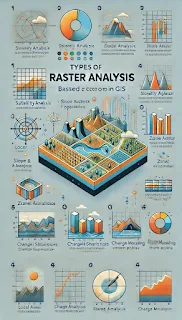
Raster Analysis


Raster analysis is a powerful spatial analysis technique used in GIS to process and interpret grid-based datasets. It is widely applied in fields such as land cover classification, terrain modeling, hydrological studies, environmental monitoring, and spatial decision-making.

How Raster Analysis Works

Raster data is stored in a grid format where each cell (or pixel) represents a specific geographic location and contains a single value. The value can represent elevation, temperature, land cover type, or any other spatially continuous variable.

1. Spatial Resolution

  • The size of each cell in a raster dataset determines the level of detail.
  • Example: A 30m resolution DEM (Digital Elevation Model) means each cell represents a 30m × 30m area.

2. Extent

  • The geographic area covered by a raster dataset.
  • Example: A raster covering an entire country will have a larger extent than one covering a single city.

3. Cell Values and Data Types

  • Continuous Data: Represents smoothly varying phenomena (e.g., elevation, temperature, precipitation).
  • Categorical (Discrete) Data: Represents distinct classes (e.g., land use types, soil types).

Types of Raster Analysis in GIS

1. Overlay Analysis

Combines multiple raster layers to identify spatial relationships.

  • Example: Identifying flood-prone areas by overlaying elevation, rainfall, and land use rasters.

2. Suitability Analysis

Determines the best location for a specific activity based on multiple criteria.

  • Example: Finding a suitable site for a wind farm using layers like wind speed, land use, and proximity to roads.

3. Slope Analysis

Calculates the steepness of terrain from a DEM.

  • Example: Identifying areas with slopes greater than 30° for landslide risk assessment.

4. Aspect Analysis

Determines the direction a slope is facing.

  • Example: Finding south-facing slopes suitable for solar panel installation.

5. Distance Analysis

Measures the distance from a given feature.

  • Example: Mapping areas within 1 km of a river for ecological conservation.

6. Zonal Statistics

Summarizes raster values within defined zones (e.g., administrative boundaries).

  • Example: Calculating average rainfall within different watersheds.

7. Image Classification

Assigns land cover types to satellite images using supervised or unsupervised classification techniques.

  • Example: Classifying Sentinel-2 imagery into urban, forest, water, and agriculture classes.

8. Change Detection

Identifies changes in land cover or other raster datasets over time.

  • Example: Analyzing deforestation by comparing Landsat images from 2000 and 2020.

9. Terrain Analysis

Uses DEMs to derive hydrological and topographical features.

  • Example: Identifying valleys, ridges, and watershed boundaries.

10. Surface Modeling

Creates interpolated surfaces from point data.

  • Example: Generating a temperature surface from scattered weather station data.

Analysis Types Based on Cell Interactions

1. Local Operations (Per-Cell Analysis)

  • Each cell is analyzed independently without considering neighbors.
  • Example: Applying a mathematical function to all cells in a raster (e.g., converting elevation from meters to feet).

2. Neighborhood Operations (Focal Analysis)

  • A cell's value is determined based on surrounding cells.
  • Example: Applying a moving window filter (e.g., smoothing an elevation raster using a 3x3 mean filter).

3. Zonal Operations

  • Groups of cells belonging to the same zone are analyzed collectively.
  • Example: Calculating average elevation within different land use zones.

4. Global Operations

  • The entire raster dataset is used to compute an output.
  • Example: Calculating flow direction for an entire watershed.

Comments

Popular posts from this blog

Energy Interaction with Atmosphere and Earth Surface

In Remote Sensing , satellites record electromagnetic radiation (EMR) that is reflected or emitted from the Earth. Before reaching the sensor, radiation interacts with: The Atmosphere The Earth's Surface These interactions control how satellite images look and how we interpret them. I. Interaction of EMR with the Atmosphere When solar radiation travels from the Sun to the Earth, four main processes occur: 1. Absorption Definition: Absorption occurs when atmospheric gases absorb radiation at specific wavelengths and convert it into heat. Main absorbing gases: Ozone (O₃) → absorbs Ultraviolet (UV) Carbon dioxide (CO₂) → absorbs Thermal Infrared Water vapour (H₂O) → absorbs Infrared Concept: Atmospheric Windows These are wavelength regions where absorption is very low, allowing radiation to pass through the atmosphere. Remote sensing depends on these windows. For example, satellites like Landsat 8 use visible, near-infrared, and thermal bands located in atmospheric windows. 2. Trans...

REMOTE SENSING INDICES

Remote sensing indices are band ratios designed to highlight specific surface features (vegetation, soil, water, urban areas, snow, burned areas, etc.) using the spectral reflectance properties of the Earth's surface. They improve classification accuracy and environmental monitoring. 1. Vegetation Indices NDVI – Normalized Difference Vegetation Index Formula: (NIR – RED) / (NIR + RED) Concept: Vegetation reflects strongly in NIR and absorbs in RED due to chlorophyll. Measures: Vegetation greenness & health Uses: Agriculture, drought monitoring, biomass estimation EVI – Enhanced Vegetation Index Formula: G × (NIR – RED) / (NIR + C1×RED – C2×BLUE + L) Concept: Corrects for soil and atmospheric noise. Measures: Vegetation vigor in dense canopies Uses: Tropical rainforest mapping, high biomass regions GNDVI – Green Normalized Difference Vegetation Index Formula: (NIR – GREEN) / (NIR + GREEN) Concept: Uses Green instead of Red ...

Atmospheric Window

The atmospheric window in remote sensing refers to specific wavelength ranges within the electromagnetic spectrum that can pass through the Earth's atmosphere relatively unimpeded. These windows are crucial for remote sensing applications because they allow us to observe the Earth's surface and atmosphere without significant interference from the atmosphere's constituents. Key facts and concepts about atmospheric windows: Visible and Near-Infrared (VNIR) window: This window encompasses wavelengths from approximately 0. 4 to 1. 0 micrometers. It is ideal for observing vegetation, water bodies, and land cover types. Shortwave Infrared (SWIR) window: This window covers wavelengths from approximately 1. 0 to 3. 0 micrometers. It is particularly useful for detecting minerals, water content, and vegetation health. Mid-Infrared (MIR) window: This window spans wavelengths from approximately 3. 0 to 8. 0 micrometers. It is valuable for identifying various materials, incl...

Landsat 8 Band designation and Band Combination.

Landsat 8 Band designation and Band Combination.  Landsat 8-9 Operational Land Imager (OLI) and Thermal Infrared Sensor (TIRS) Bands Wavelength (micrometers) Resolution (meters) Band 1 - Coastal aerosol 0.43-0.45 30 Band 2 - Blue 0.45-0.51 30 Band 3 - Green 0.53-0.59 30 Band 4 - Red 0.64-0.67 30 Band 5 - Near Infrared (NIR) 0.85-0.88 30 Band 6 - SWIR 1 1.57-1.65 30 Band 7 - SWIR 2 2.11-2.29 30 Band 8 - Panchromatic 0.50-0.68 15 Band 9 - Cirrus 1.36-1.38 30 Band 10 - Thermal Infrared (TIRS) 1 10.6-11.19 100 Band 11 - Thermal Infrared (TIRS) 2 11.50-12.51 100 Vineesh V Assistant Professor of Geography, Directorate of Education, Government of Kerala. https://www.facebook.com/Applied.Geography http://geogisgeo.blogspot.com

Landsat band composition

Short-Wave Infrared (7, 6 4) The short-wave infrared band combination uses SWIR-2 (7), SWIR-1 (6), and red (4). This composite displays vegetation in shades of green. While darker shades of green indicate denser vegetation, sparse vegetation has lighter shades. Urban areas are blue and soils have various shades of brown. Agriculture (6, 5, 2) This band combination uses SWIR-1 (6), near-infrared (5), and blue (2). It's commonly used for crop monitoring because of the use of short-wave and near-infrared. Healthy vegetation appears dark green. But bare earth has a magenta hue. Geology (7, 6, 2) The geology band combination uses SWIR-2 (7), SWIR-1 (6), and blue (2). This band combination is particularly useful for identifying geological formations, lithology features, and faults. Bathymetric (4, 3, 1) The bathymetric band combination (4,3,1) uses the red (4), green (3), and coastal bands to peak into water. The coastal band is useful in coastal, bathymetric, and aerosol studies because...