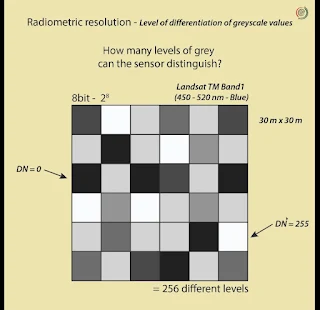
8 bit and 16 bit image

In remote sensing, "eight-bit" and "sixteen-bit" refer to the number of bits used to represent the pixel values in an image. This affects the image's color or grayscale depth, which, in turn, influences the level of detail and precision in the image.


- Eight-Bit Image: An eight-bit image uses 8 bits per pixel to represent color or grayscale information. This means each pixel can have 2^8 (256) different possible values. In a grayscale eight-bit image, you have 256 shades of gray, ranging from black to white. In a color eight-bit image, you can represent a limited palette of 256 colors. Eight-bit images are suitable for basic visual interpretation but may lack fine detail and subtle color variations.


- Sixteen-Bit Image: A sixteen-bit image uses 16 bits per pixel, providing a significantly wider range of possible values, which is 2^16 (65,536). In remote sensing, sixteen-bit images are often used when high precision is required, especially in applications like land cover classification or analysis of subtle variations in terrain or vegetation. These images can represent a much broader range of colors or grayscale shades, making them ideal for detailed and accurate analysis.


In simple terms, the difference between eight-bit and sixteen-bit images in remote sensing is the level of detail and precision they offer. Sixteen-bit images can capture more information and nuances in the data, making them suitable for more advanced and accurate analysis, while eight-bit images are more basic and suitable for visual interpretation and simple applications.

Comments

Popular posts from this blog

Supervised Classification

Image Classification in Remote Sensing Image classification in remote sensing involves categorizing pixels in an image into thematic classes to produce a map. This process is essential for land use and land cover mapping, environmental studies, and resource management. The two primary methods for classification are Supervised and Unsupervised Classification . Here's a breakdown of these methods and the key stages of image classification. 1. Types of Classification Supervised Classification In supervised classification, the analyst manually defines classes of interest (known as information classes ), such as "water," "urban," or "vegetation," and identifies training areas —sections of the image that are representative of these classes. Using these training areas, the algorithm learns the spectral characteristics of each class and applies them to classify the entire image. When to Use Supervised Classification:   - You have prior knowledge about the c...

Image Transformation

In remote sensing, image transformation is used to create new images by manipulating existing ones, enhancing the information extracted from each pixel. Multi-image manipulation and other transformations allow analysts to highlight specific features, compare time-series data, or reduce data dimensions for better interpretation. 1. Multi-Image Manipulation This technique involves applying mathematical operations to multiple images, typically from different bands, dates, or sensors, to highlight specific features or changes. Common methods include: a. Image Addition Purpose : Highlights areas of similarity or enhances features when the same objects appear in multiple images. How it Works : By adding pixel values from two images, the output image emphasizes areas where brightness is high in both. Example : Enhancing overall brightness or detecting seasonal changes by adding images from different times. b. Image Subtraction Purpose : Identifies differences between images, useful for chan...

Spatial Feature Manipulation and Filtering

1. Spatial Feature Manipulation: Spatial Frequency Spatial frequency describes how quickly brightness changes across an image. It can reveal different levels of detail, based on how often these changes occur: High Spatial Frequency : Areas where brightness changes quickly, like edges, fine textures, or detailed patterns. These parts contain high detail but can also include noise. Low Spatial Frequency : Areas with gradual changes in brightness, like smooth surfaces or broad homogeneous areas. These regions are usually featureless, such as water bodies or large agricultural fields. Zero Spatial Frequency : Represents a completely uniform area with no brightness variation. This area is very smooth and has no texture or detail. By manipulating spatial frequencies, we can enhance or suppress certain features in an image. Spatial filtering is one of the primary methods to perform this manipulation. 2. Spatial Filtering and Spatial Domain Spatial filtering is the process of applying mathe...

Geometric Correction

When satellite or aerial images are captured, they often contain distortions (errors in shape, scale, or position) caused by many factors — like Earth's curvature, satellite motion, terrain height (relief), or the Earth's rotation . These distortions make the image not properly aligned with real-world coordinates (latitude and longitude). 👉 Geometric correction is the process of removing these distortions so that every pixel in the image correctly represents its location on the Earth's surface. After geometric correction, the image becomes geographically referenced and can be used with maps and GIS data. Types  1. Systematic Correction Systematic errors are predictable and can be modeled mathematically. They occur due to the geometry and movement of the satellite sensor or the Earth. Common systematic distortions: Scan skew – due to the motion of the sensor as it scans the Earth. Mirror velocity variation – scanning mirror moves at a va...

Isodata clustering

Iso Cluster Classification in Unsupervised Image Classification Iso Cluster Classification is a common unsupervised classification technique used in remote sensing. The "Iso Cluster" algorithm groups pixels with similar spectral characteristics into clusters, or spectral classes, based solely on the data's statistical properties. Unlike supervised classification, Iso Cluster classification doesn't require the analyst to predefine classes or training areas; instead, the algorithm analyzes the image data to find natural groupings of pixels. The analyst interprets these groups afterward to label them with meaningful information classes (e.g., water, forest, urban). How Iso Cluster Classification Works The Iso Cluster algorithm follows several steps to group pixels: Initial Data Analysis : The algorithm examines the entire dataset to understand the spectral distribution of the pixels across the spectral bands. Clustering Process :    - The algorithm starts by divid...